
|

Ultrapico is excited to announce
Expresso 3.0, a major enhancement to the the
award winning regular expression development tool. All of the
features of Expresso 2.1 are preserved, but with major
improvements to the user interface, the Builder and the
Analyzer.
We appreciate your help and
feedback. Our goal is to make Expresso the best .NET regular expression
development tool on the planet.
Here are some of the features:
-
Still free of charge!
-
Build complex regular
expressions by selecting components from a palette
-
Test expressions against real
or sample input data
-
Display all matches in a tree
structure, showing captured groups, and all captures within
a group
-
Build replacement strings and
test the match and replace functionality
-
Highlight matched text in the
input data
-
Test automatically for syntax
errors
-
Generate Visual Basic, C#, or
C++ code
-
Save and restore data in a
project file
-
Maintain and expand a library
of frequently used regular expressions
-
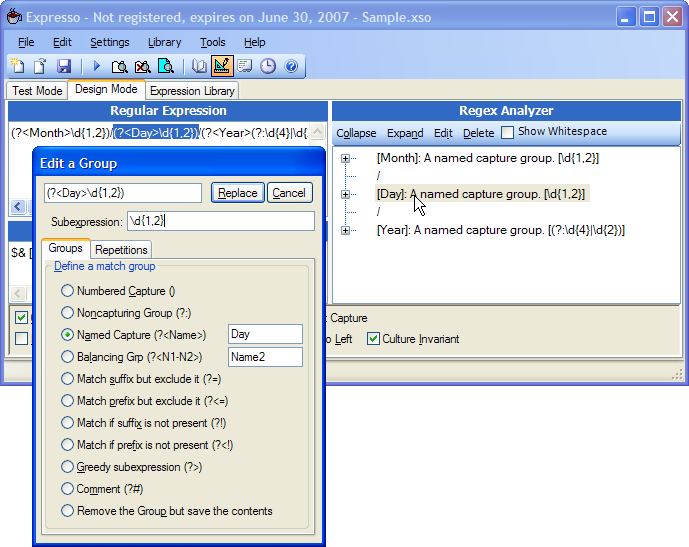
Dramatically enhanced
Analyzer
-
Analyzes and describes
your regular expression in a tree structure
-
Updated continuously in a
separate thread
-
Edit portions of your
regular expression by selecting nodes in the Analyzer
view
-
Immediate feedback on
syntax errors
-
Highlight portions of
your expression for partial matching
-
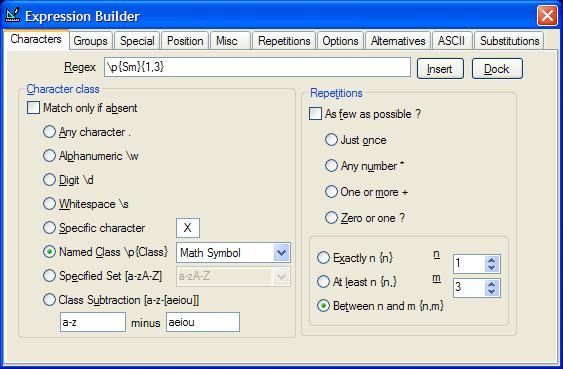
Rich new Builder and editing
features
-
Easier to use Builder
-
Support for .NET 2.0
features like character class subtraction and new
Unicode classes
-
Extensive editing
capabilities via context menus in both text view and
Analyzer view
-
Builder can be docked or
undocked from the Main Expresso window
-
Full Undo/Redo capability
-
Additional New features
-
Line by line validation
testing
-
Test the Regex.Split()
method
-
Export match results to
Excel, XML, etc.
-
Carriage return, line
feed, and other invisible characters are visible in the
search results
-
Drag and drop files and
text
-
Insert arbitrary Unicode
characters in sample text or regular expression
-
Code generation for the
new C++/CLI syntax in addition to the old MC++
-
Code generation for
Replacement String and templates for Replace(), Split(),
Match() and other regex methods
-
Turn Tooltips on or off
-
Support for very long
data files
-
Startup tips to guide new
users
-
Improvements and additions to the Regex
Library
-
Improvements to threading to
allow reliable interruption of slow expressions.
|